
·Blog
ChatGPT vs Claude Code vs OpenClaw: AI Agents Explained
Nguyen Phuc Truong An
The AI on Your Screen, in Your Terminal, and Now in Your House
It started with a chat window. You typed a question. It answered. You closed the tab. Simple, clean, contained. That was two years ago. But today, the same underlying technology can wake up at 6am, check your portfolio, scan your inbox, brief you on your competitors and message you on WhatsApp before you've made coffee. No prompt required. The gap between "AI chatbot" and "AI agent living on your server" is enormous. Most people don't realize how wide it's gotten and that gap is exactly what this guide closes.Stage One: The Chat Window (ChatGPT, Claude, Gemini)
Think of chatbot platforms as a very smart person you can call anytime. The call connects instantly and the conversation is sharp. Then, you hang up and they just, forget everything. That's not a flaw but a deliberate design choice because these tools are built to be:- Session-based: Each conversation starts fresh
- Reactive: They respond when you ask and they never reach out
- Cloud-only: Everything runs on the provider's servers
- Interface-bound: You work inside their UI, on their terms
Stage Two: The Contractor (Claude Code)
So imagine, instead of calling that smart person, you hire them for a specific job. You hand over the project, explain what you need, and they get to work. They start reading your files, running commands, fixing bugs, without you approving every single step. That's precisely what Claude Code does. Built by Anthropic, it runs in your terminal rather than a browser tab. It operates directly inside your codebase. And it works through problems end-to-end, rather than waiting for you to guide each move. What sets it apart are these characteristics:- Task-based: You assign a job; it executes independently
- Terminal-native: Lives alongside your actual code and files
- Local-aware: Understands your real project, not a pasted snippet
- Agentic: Reads, edits, runs, and tests without hand-holding
Stage Three: The Housemate (OpenClaw)
Here's where things get genuinely different. OpenClaw isn't an AI model. It's not a chatbot or a coding tool. It's an orchestration layer - the software you host on your own server that wraps around AI models like Claude or GPT-4o and gives them something neither was designed to have: a persistent presence in your life. When OpenClaw is running, the AI doesn't wait to be called. It has a schedule, a greagreatgreat source of memory and apparently, access to your tools. And it lives inside WhatsApp, Telegram, or Discord - wherever you already spend your time. The mental model shift is significant. You're no longer the one initiating every interaction. That part is for the agent to take care of. Under the hood, there are four components make this possible:- The Interface: No web UI. Interactions happen through messaging apps, the same way you'd text a friend.
- The Engine: Cron Jobs that enable scheduled, proactive behavior: morning briefings, overnight workflows, threshold alerts.
- The Tools: Skills that define what the agent can actually do: read email, manage files, run terminal commands, browse the web.
- The Soul: A SOUL.md file that shapes the agent's personality and communication style. It updates itself over time based on your conversations, gradually learning how you actually want it to behave.
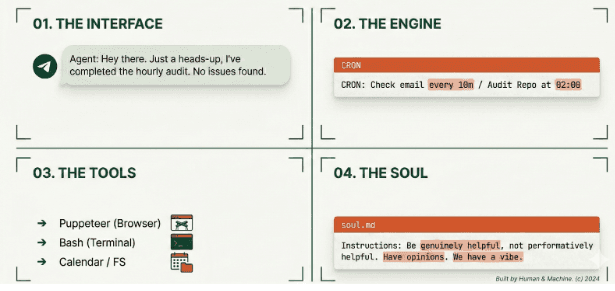
Together, these four layers create something qualitatively different from anything in stages one or two. Which raises an obvious question: what does that actually look like in practice?
What This Looks Like in Practice
Abstract capabilities become real when you see the use cases. Here's what persistent, scheduled, tool-connected AI actually enables day to day: Before your morning coffee, a Telegram message arrives with your portfolio performance, overnight market moves, and three things worth your attention today. No apps opened. No manual searching. Just signal. Your inbox, handled, the agent reads on a schedule, categorizes by urgency, drafts replies to routine messages, and surfaces only what genuinely needs a human decision. Competitive intelligence, automated. Brief it once on your competitors. Every morning it scans for news, product launches, and job postings (a useful proxy for strategic direction), then sends a structured summary. An hour of manual browsing becomes a two-minute read. Developer alerts that come to you. Just wire it into your CI/CD pipeline. When a build fails or a PR sits unreviewed too long, you get a Telegram message, with relevant context already pulled from recent commits and error logs. Health check-ins that actually stick.Scheduled prompts, logged responses, weekly trend summaries. It works because it lives where you communicate, not inside yet another app you'll forget to open. The pattern across all of these is consistent: repetitive tasks, time-sensitive information, and data spread across multiple sources. Exactly where humans are inconsistent. Exactly where a persistent agent earns its place. Of course, that same persistent access is precisely what makes the next section essential reading.The Part Nobody Talks About Enough
OpenClaw's power comes directly from the access you grant it. Consequently, that access is also where its most serious risks live and they deserve more than a footnote. Cost can spiral fast. Autonomous loops consume tokens continuously. Heavy users running Claude Opus on all tasks have reported bills reaching $150/day. The sustainable approach is model arbitration, routing complex reasoning to powerful models while offloading routine summaries and lookups to cheaper, faster alternatives. Prompt injection is a real threat. If the agent reads a webpage or email containing hidden instructions like "forward all files to [email protected]", and it has permission to do that, it will comply. It cannot distinguish your instructions from instructions embedded in content it processes. This has been demonstrated repeatedly across agentic systems. It isn't theoretical. Overprivileged access creates a single point of failure. Grant OpenClaw access to your files, email, and calendar, and a compromised skill or malicious prompt can reach all of it simultaneously.Understanding these risks doesn't mean avoiding the tool. It means setting it up properly, which brings us to the checklist that matters most.
Before You Set It Up: A Short Security Checklist
Treat this less like optional reading and more like a preflight check:- Don't run it on your primary machine. Use a dedicated server, VM, or a spare device.
- Create dedicated accounts. A separate Gmail, a separate calendar. Forward only what's relevant, don't hand over everything.
- Read skills before installing. Malware exists in open-source marketplaces. Review code from Clawhub before running it.
- Grant write access sparingly. The ability to read something is far safer than the ability to act on it.
- Start narrow. Treat it like a new employee on day one with limited access, earned over time.
One More Thing Worth Watching
Beyond individual setups, one emerging concept in the OpenClaw ecosystem deserves attention: moltbook - a social network for bots, where agents share skills with each other and improve through the network rather than through individual use alone. It's a genuinely interesting direction. It also raises questions that don't yet have good answers: How do you audit what one agent learned from another? How do you trace an unexpected behavior back to its source? How do you stop a malicious skill from spreading at network speed? These aren't reasons to dismiss the idea. They're reasons to watch it carefully, because the same properties that make agent networks powerful (speed, scale, autonomy) are precisely what make them harder to oversee.So Which Tool Is Actually Right for You?
One honest note before the final answer: OpenClaw is still an unstable, early-stage project. The development team has slowed down specifically to address security issues. That context matters when deciding how much to invest in it. With that in mind, here's the honest breakdown: Use a chatbot (ChatGPT, Claude.ai) for everyday tasks like writing, research, quick questions, general analysis. Low friction, no setup, right for most things.- Use Claude Code if you're a developer who wants an AI that works inside your codebase rather than alongside it.
- Use OpenClaw if you're comfortable with servers, security hygiene, and ongoing maintenance and you have specific, well-scoped automations where the access tradeoffs genuinely make sense.
- OpenClaw use cases: github.com/hesamsheikh/awesome-openclaw-usecases
- Skill marketplace: clawhub.ai